
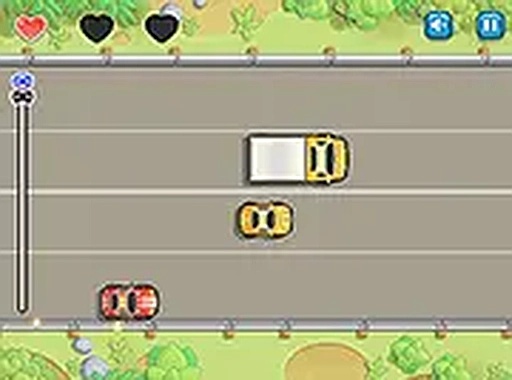
Steering Through Unpredictable Traffic
Traffic Dash Navigator puts you behind the wheel on roads that get busier as you progress. Your only controls are left and right, but the challenge comes from reading the road ahead. Other vehicles can switch lanes without warning, so you cannot simply hold a line and hope for the best. Each run generates a fresh traffic pattern, which means memorizing one layout will not help you in the next attempt. The game rewards observation and quick adjustments rather than raw speed.
Three Strikes and a Focus on Clean Driving
Collisions cost you. You start with three health points, and each impact with another vehicle removes one. After the third hit, the run ends. This system pushes you toward defensive driving: leaving space, anticipating lane changes, and choosing safe gaps over risky overtakes. A stage completed without any contact earns the highest rating, so the scoring actively discourages reckless speed. As you advance, traffic density increases and vehicles move faster, creating a difficulty curve that grows steadily without becoming overwhelming.
Browser-Based Play on Desktop and Mobile
You can play Traffic Dash Navigator directly in a web browser on both desktop computers and mobile devices. No installation or download is required. On a computer, the arrow keys handle steering. On a phone or tablet, touch gestures control your movement. A full-screen option is available for a more focused view during intense sections. The interface stays clean and uncluttered, keeping your attention on the road ahead rather than on menus or overlays.
Star Ratings and Replay Value
Each level ends with a performance evaluation based on how many collisions you had. A perfect run with zero impacts awards the maximum three-star rating. This gives you a clear reason to replay stages and refine your technique. Because the traffic patterns change between attempts, improvement comes from developing general driving habits rather than memorizing a fixed sequence. Short session lengths and straightforward scoring make the game easy to pick up for a quick run or a longer practice session.






Comments
0 comments