
A Coloring Book, Not a Contest
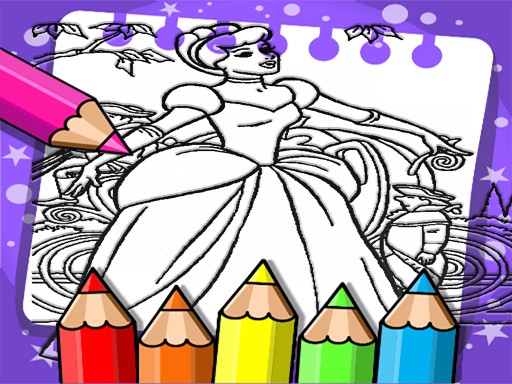
Cinderella Color Book Art Game is a digital coloring activity built around the classic fairy tale. Instead of racing a clock or chasing a high score, players select from a collection of more than 50 hand-drawn images and fill them with color. The pictures cover Cinderella herself, her ball gown, the glass slipper, and her magical friends. Each drawing is designed to be cute and approachable for young children. The game runs in a web browser on both desktop and mobile devices, so it works at home or while traveling.
How a Coloring Session Works
Start by choosing any image from the collection. A color palette sits at the bottom of the screen; tap or click a shade, then tap the area you want to fill. For small details, the zoom feature lets you see and color tight spaces more precisely. If a color lands where it should not, the undo button removes the last fill without resetting the whole page. There are no timers, no scores, and no ads. When a picture is finished, it can be saved and shared with family. The interface uses large buttons and clear icons so young children can navigate independently.
Designed for Young Artists
The lack of competition is deliberate. Without time pressure or scoring, children can work at their own pace, which supports relaxation and the natural development of fine motor skills. The environment contains no inappropriate content, and the absence of ads means no distractions or accidental clicks. The game is intended for children, though the simple mechanics and familiar fairy-tale theme make it accessible to anyone who enjoys coloring.



Comments
0 comments