
Tap-to-Steer Downhill Running
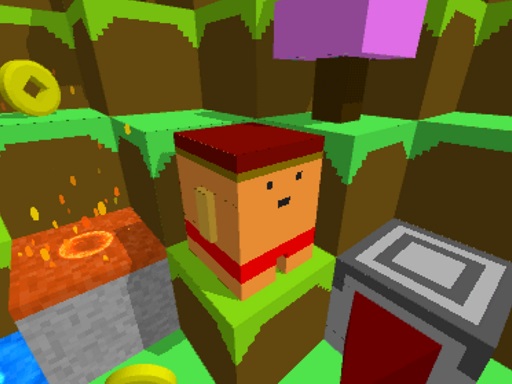
The entire control scheme rests on two inputs: tap the left side of the screen to move left, tap the right side to move right. The character moves downhill automatically, so steering is the only thing you manage. That constraint is the game's identity. Obstacles such as rocks and barriers appear in your path, and the speed climbs as a run continues, shrinking the window for each tap. Because there are no buttons, combos, or meters to watch, the challenge lives entirely in reaction timing.
Coins, Skins, and Locations
Coins are scattered along the downhill route, and collecting them is the main reason to take risks rather than hug the safest line. The coins fund two categories of unlocks: character skins and game locations. Skins change how your runner looks; locations change the backdrop and route you play through. That loop gives each run a purpose beyond survival, since a sloppy run with fewer coins still moves you toward the next unlock.
Difficulty Curve and Level Structure
Blocky Rush Downhill Arcade is level-based rather than a single infinite track. Each level introduces new challenges, and the rising speed forces faster decisions and more precise taps. Early levels teach the tap rhythm; later ones punish hesitation. The progression is designed so that improvement feels earned rather than random, and the increasing difficulty keeps the game engaging for players who stick with it.
Who This Is For
The blocky art style and simple controls make this an easy recommendation for casual players, children, and anyone who wants a short session without a tutorial. The family-friendly presentation keeps the content safe for all ages. Players who prefer deep systems or narrative will find the scope limited, but those who enjoy chasing higher scores and unlocking cosmetics will get the most out of repeated runs.





Comments
0 comments